
Sonnet Suites - V13 Integration to Cadence Virtuoso
New Features at a Glance
- Ability to read process stack and layer mapping from existing technology files in the form of Assura Tech files, Helic technology files, Agilent technology (.tch), Sonnet material (.matl) and preexisting Sonnet Project files (.son).
- Automatic import of Helic shape pins for EM project port definitions
- Layout look-alike symbols auto-generated for EM model data for Cadence Schematic Composer
- Integrated EM analysis progress monitor bar when active EM simulation is running
- Automatic micro via array simplification invoked for PCell->Sonnet geometry translation
- Advanced feature switches for Sonnet incorporated in the interface
- Many Sonnet features such as Estimate Memory, View Subsections, Check License, View Far Field and more are now implemented directly in the Sonnet interface
- Translation, EM simulation, extraction model generation and Schematic Composer symbol generation can be completely automated by the process or EDA tool manager through States to pre-set for a given technology
- EM model extraction process can be highly automated for non-EM users
- Compatibility 64 bit Linux operating systems for IC614 and above
- New port capabilities -- Co-calibrated ports and auto-grounded ports have been implemented along with +/- ports to create differential port pairs. Diagonal ports with or without reference planes are also supported and will be converted to Co-calibrated ports.
- Single-click access to view EM analysis discretization
- "Simulate and Release" to enable EM processing to continue without locking the Virtuoso design environment
- Implementation of the new via metal and via meshing definitions
- Implementation of new via simplification technology for Sonnet project translation
- Advanced settings for users are now available in the interface, and may be set by States for rapid future recall
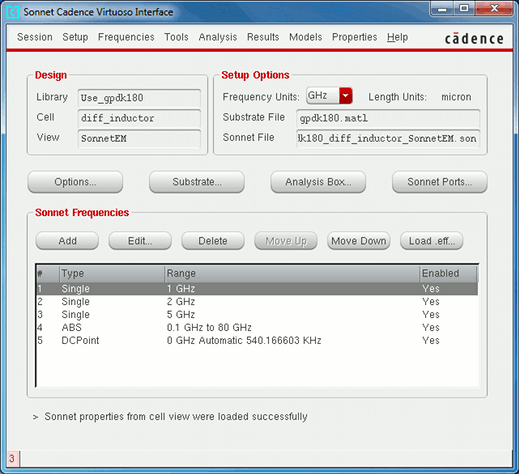
Sonnet Suites EM model extraction application window in Cadence Virtuoso
Process and Stackup Import
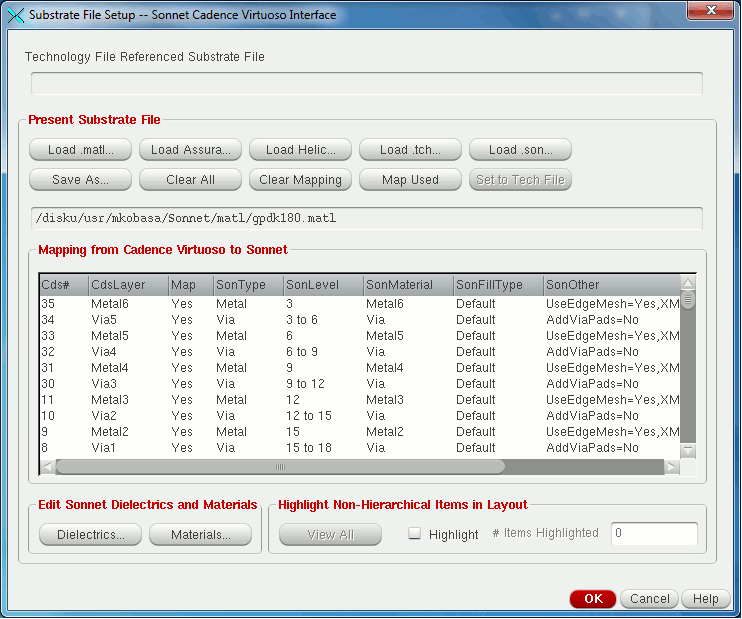
Substrate Stackup enables process definitions to be imported from a variety of sources
(click to view full size)
New in Release 13 is the ability for Sonnet's Cadence Interface to read existing PDK stackup and layer mapping information through existing process technology definitions.
Assura proc files and Helic technology files can now be converted to the Sonnet .matl file used in this interface, or they may be converted to Sonnet Project File templates used in the native Sonnet editor. Sonnet Project files (.son files) may also be referenced to create Sonnet Material (.matl) files.
This import is needed once for a new process; subsequent model extractions can be set to automatically use the imported stackup information.
Interface "States" provide automation for users and saves time
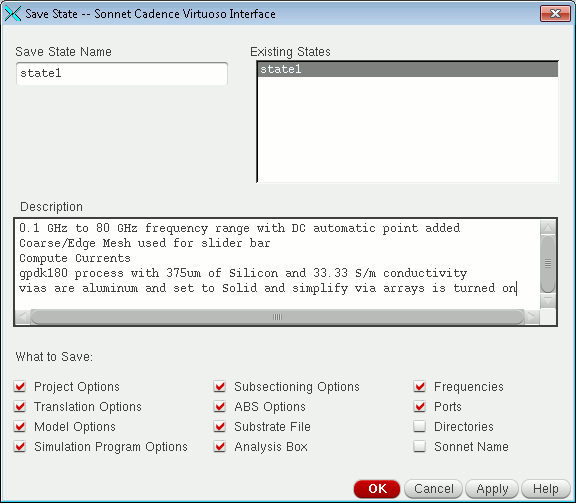
Sonnet API States provide one-click configuration for EM analysis
(click to enlarge)
The Cadence Virtuoso interface provides automation for custom design flows through the use of "States." A State provides automated pre-sets that can be invoked by the designer so that the process of EM model extraction for a given Virtuoso PCell can be initiated and completed with minimum EM knowledge and interaction. Once the State is defined for a given process technology by the EDA tools manager or process librarian, it is possible to quickly and easily invoke EM model extraction for RFIC components such as spiral inductors, baluns and transformers, and MIM capacitors.
States provide great flexibility to customize Sonnet's EM model extraction to your design flow.
Automatic Layout Look-Alike Symbol Generation
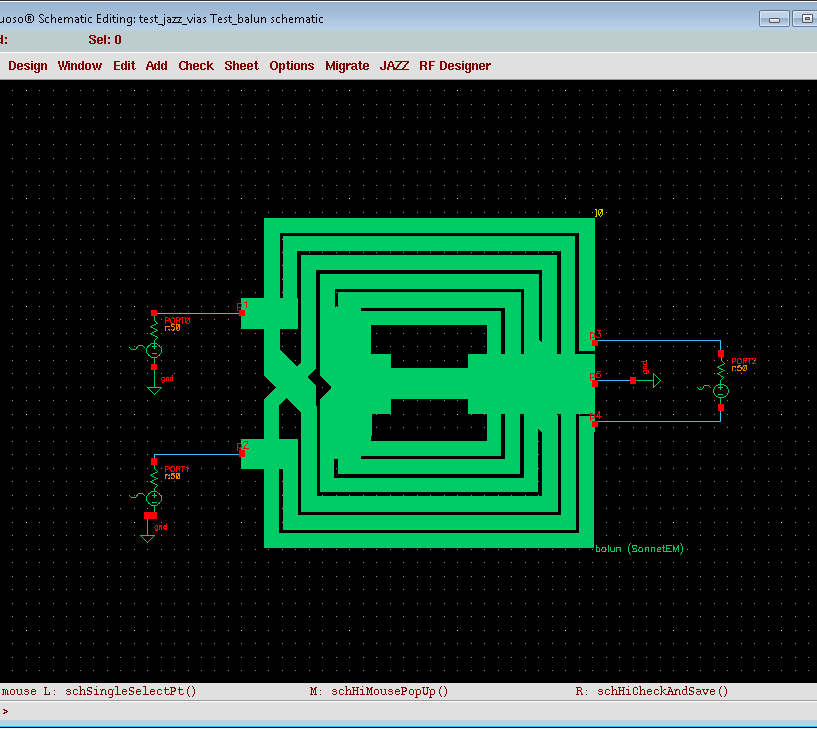
Sonnet-generated symbol in Cadence Schematic Composer
(click to view full size)
Cadence users can easily incorporate Sonnet EM extraction models without fear of mismatching data model pins in Schematic Composer designs. After EM analysis and Spice model extraction are complete, the interface automatically creates a schematic symbol with "look alike" correspondence between schematic model pins and the ports in the EM model at the pin location.
Layout look alike symbol generation reduces designer error creating schematics. The visual feedback for look alike components aid the designer in modeling the correct physical connections to the EM extraction model.


