
Sonnet Suites - Parameter Sweep Options
Test your Designs for Manufacturability
The EM Analysis Engine provides new parameter sweep analysis types useful for tolerance studies and design-formanufacturing testing. In addition to the Linear Sweep Analysis previously available, the new parameter sweeps include Corner Sweep Analysis, Sensitivity Sweep Analysis and Mixed Sweep Combinations.
Linear Sweep Analysis
A Linear Sweep analyzes your circuit at every available combination of variable values. This has been available in previous releases.
Corner Sweep Analysis
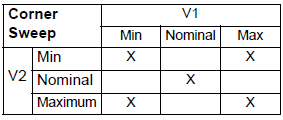
Corner sweep analysis combinations considered for two variables, V1 and V2
A corner sweep allows you to analyze the “extremes” of your variables by analyzing at all the combinations of the minimum and maximum values of the variables as well as at the nominal values. This allows you to see how your circuit varies over the data range of your variable.
Consider an example where we have 2 variables (V1 and V2) over which a Corner Sweep Analysis is applied. The table below shows the parameter combinations that will be considered in the analysis.
Sensitivity Sweep Analysis
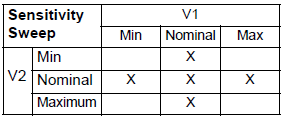
Sensitivity sweep analysis combinations for two variables, V1 and V2
A Sensitivity Sweep allows you to see how “sensitive” your circuit is to changes in any given variable. The nominal value of each variable is combined with the maximum and minimum values of the other variables as well as the nominal values.
Considering again our 2-variable example, the table blow shows the parameter combinations that will be considered in the analysis.
Mixed Sweep Analysis
Mixed Sweep Combinations allows you to define a range of values for each variable, then perform an analysis at each possible combination of variable values. There are four types of sweeps available: Fixed, Linear, Linear (# steps), and Exponential.


